The log
Choose a hole and its columns on the left; the log draws on the right, every column on the same depth scale, with a legend under it for every column.
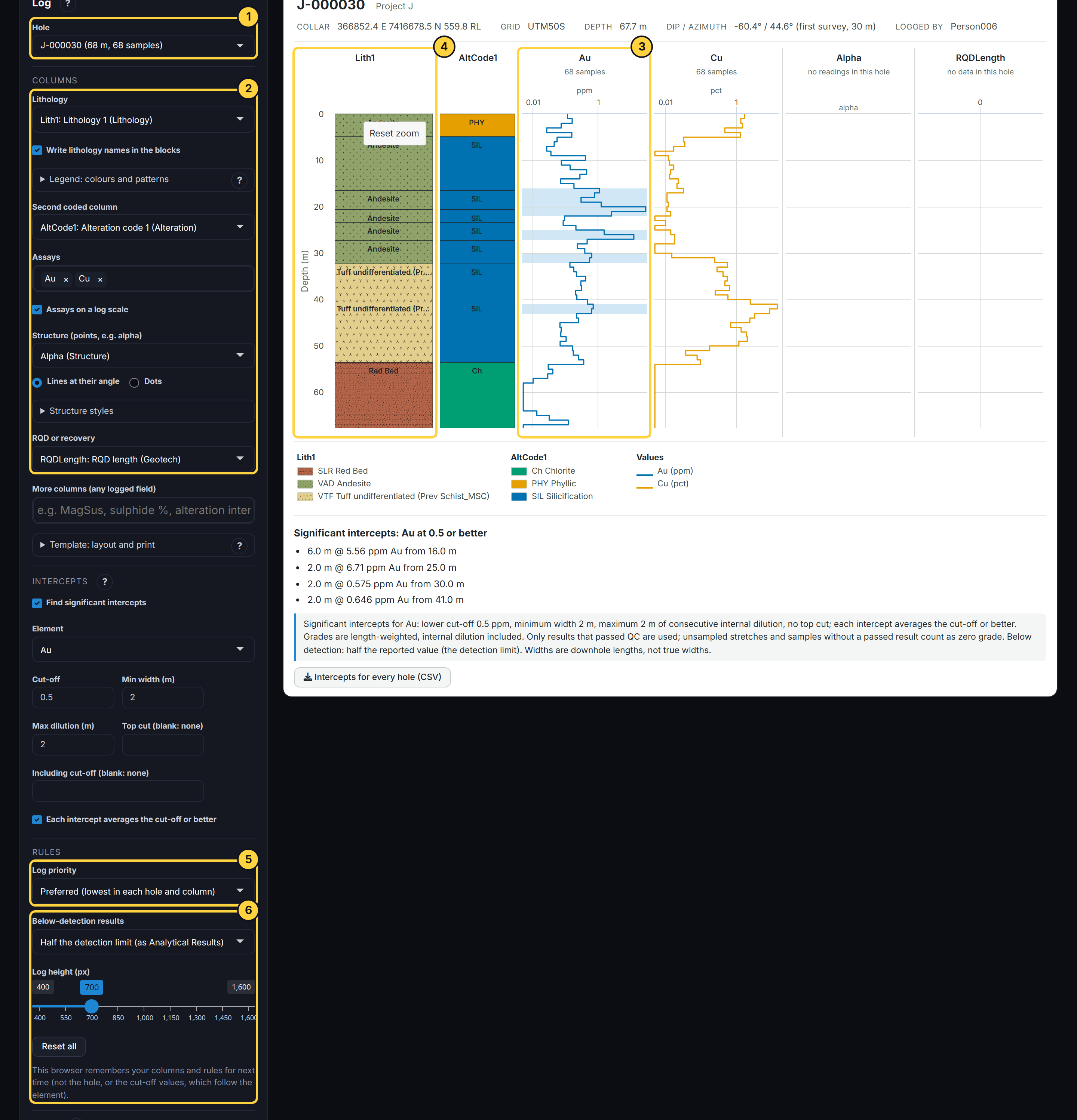
- Hole: The holes with the most samples come first. The header above the log gives the collar, grid, depth, first survey and who logged it.
- Columns: Lithology (with its colours and FGDC patterns, and its names written in the blocks or just the codes), a second coded column such as alteration, any assays, structures (lines at their angle, leaning by beta, or dots) and RQD or recovery. The structure type and beta are the fields logged beside the angle; under Structure styles, each type’s colour and line (a fault dashed, a vein orange …) are guessed from its name, and you can download them, change any and load them back. More columns adds any other logged field: MagSus, sulphide %, an intensity (drawn on a None to Intense colour ramp) … Choose (none) to leave a column out, or clear Assays or More columns.
- Assays: Each sample shows its best result: one that passed QC (PRIORITY 1) where there is one, from the site’s preferred method (lowest rank), latest load first. Where a sample has only pending or failed results, that result is shown and shaded amber (pending) or red (failed). Assays on a log scale (on by default) suits grades that span several orders of magnitude; values of zero or less are left off it.
- Zoom: Drag up or down on any column to zoom in: every column follows. Reset zoom, on the first column, brings back the whole hole. Log height, under Rules, makes the whole log taller or shorter.
- Log priority: Where a hole was logged more than once, the log shows one logging only: for each column, the lowest PRIORITY that column has in the hole (the site’s preferred), never mixed. So lithology can come from one logging and RQD from another. Choose a priority to see that logging instead; a column without it says so.
- Rules: Below-detection results (marked < in the database) count at half their reported value, normally the detection limit, by default, as in Analytical Results; or as written. This browser remembers your columns and rules for next time, but not the hole or the cut-off values, which follow the element. Reset all puts the defaults back and forgets them.