Transforming the readings
Rotate the readings, unfold a fold or apply the Terzaghi correction for sampling bias in Structural Analysis. Your file never changes.
Transform the readings, in the Data panel, changes the readings for every chart and statistic. When any transform is on, a yellow note with Undo all appears above the charts and on the Overview. Data health, the readings table and the table by structure type keep the originals. Your file never changes.
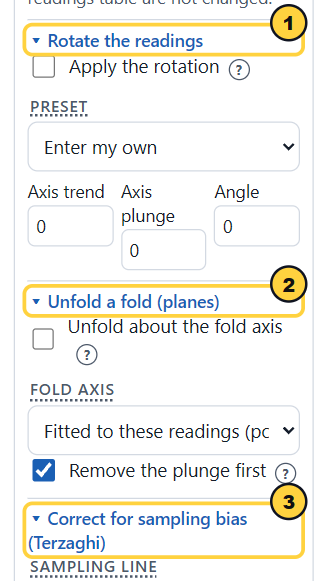
- Rotate the readings: Turns every reading about an axis before it is plotted. Use it to restore bedding to horizontal, remove a fold’s plunge, or change north. Positive angles turn clockwise looking along the way the axis plunges. The presets fill in the axis and angle for you.
- Unfold a fold: Turns every plane about the fold axis, each by its own angle, until the limbs lie flat. A cylindrical fold collapses to one point. Any scatter left is the fold’s departure from a cylinder. If the beds lie a median of more than 15° from the fold axis, a warning says not to rely on the unfolded orientations.
- Correct for sampling bias (Terzaghi): A hole meets planes square to it far more often than planes lying along it. The correction weights each reading by 1 / |cos| of the angle between its pole and the hole, up to the Weight cap, 10 by default. The mean, kappa, cone and contours are then less biased. The rose and the set finder are not weighted. It is off by default.