Start with the demo data and reach the Overview
How do I try QC Analytical Results without my own data? Open the app, read the demo Overview and find the chart behind a finding, in five minutes.
In five minutes you will have read a laboratory’s QC verdict on the demo data and opened the chart behind it.
The demo is a made-up dataset with two laboratories, ALS and SGS. It has CRMs, duplicates and blanks for a year of despatches. Nothing you do with it is saved, and no account is needed.
Steps
- Open qaqc.app.geoscience-analytics.com. The app opens on the Overview tab with Demo chosen in the header. The first time, a short tour points out each part of the page. Take it, or close it and open it later from any ?.
- Under Lab Health, read the laboratory’s Lab Confidence and the sentence beside it. The demo opens on ALS, which is Low. The sentence names its most serious finding.
- Read the five cards under it: Accuracy (CRMs), Precision (duplicates), Contamination (blanks), Despatch coverage and Turnaround. Each shows its status and its worst finding.
- Under Current Risks, select Investigate on the first finding. The Charts tab opens with the Filters set for that finding, and the chart drawn.
- Select the Overview tab again, then SGS on the lab switch. The page shows the second laboratory.
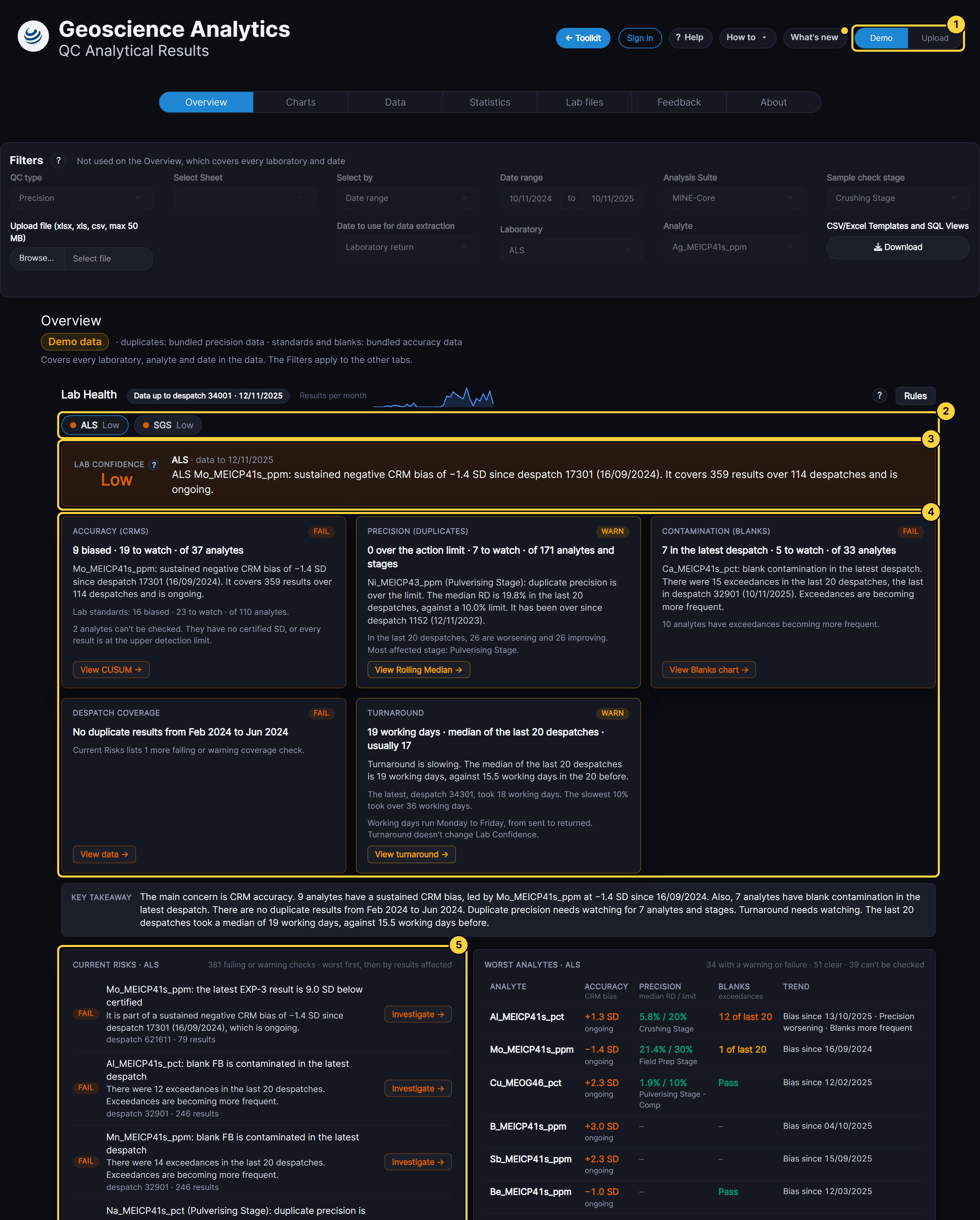
- Demo / Upload: the data source. Demo is chosen.
- Lab switch: the laboratory shown, with its Lab Confidence dot.
- Lab Confidence and headline: the verdict and its most serious finding.
- Domain cards: one for each kind of QC, with a button to its chart.
- Current Risks: every failing or warning check, worst first.
Result
The Overview shows one laboratory’s QC health, and every finding on it opens the chart that supports it.
If something goes wrong
- The page is blank for a few seconds. The app is reading the demo data. The Overview appears when it has finished.
- The tour covers what you want to see. Select Skip tour. No more tours stops every tour in this browser.
Next steps
- Sign in to use your own data
- The Student guide: Overview explains how each verdict is reached.