Save CRM values to your library
How do I keep my CRM values in QC Analytical Results? Save them to the CRM library in your account, add more standards later, and give a client its own library.
At the end your certified values are in your account, loaded by themselves every time you open the Lab files tab.
Signed in, the CRM library is kept with your account. You fill it from a standards table or the template, once. A consultancy keeps a library for each client as well, and a client’s projects are judged against the client’s library.
Before you begin
- Signed in.
- A standards table or the filled-in template. Load your CRM certified values says what it holds.
Steps
There are two ways in. The first is quicker when the values are already loaded for the session.
- Under the CRM certified values card, select Save them to your CRM library. The message says how many standards and values were added and how many existing values were updated. Done.
Or, to add values straight to a library:
- Scroll to Your set-up and select the CRM library pill.
- With clients, choose under Library your account or a client. With none, the box isn’t shown and the values go to your account.
- Under Add certified values, select Choose file… and pick the file. The card says how many standards and values it read, and lists anything it could not use.
- Select Add these values to this library. The table below lists each standard with its owner, type, supplier and number of values, and which library it is in.
- Select a standard’s row to see its values. Delete
removes it and its values.
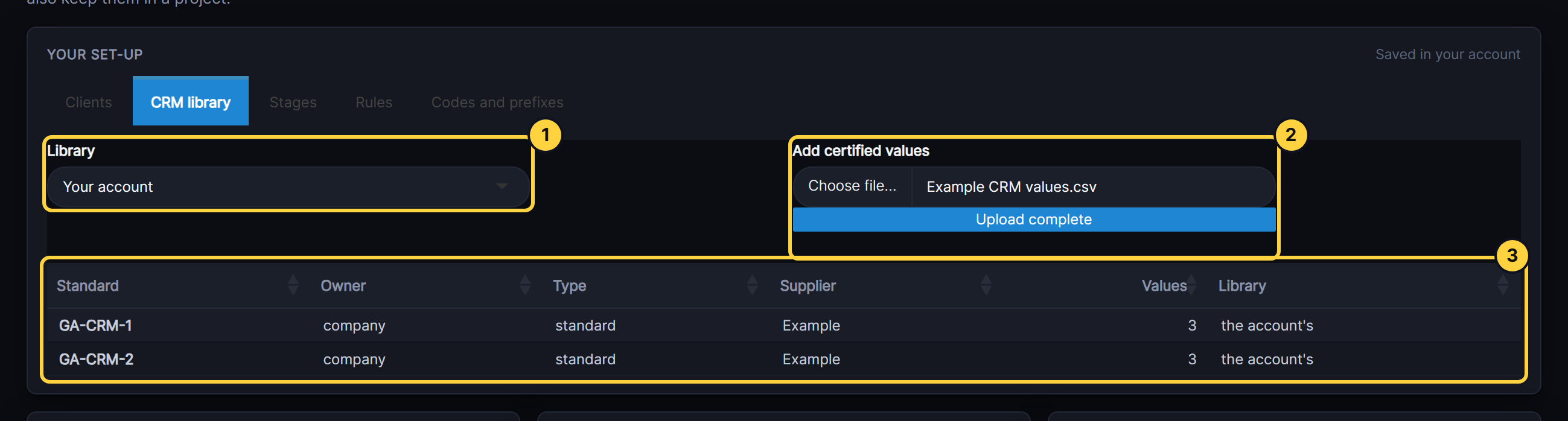
- Library: the account’s library, or a client’s.
- Add certified values: a standards table or the template.
- CRM library: the standards, one row each. Select one to see its certified values.
Result
The CRM certified values card reads “Using your CRM library”, and the standards table under Your set-up lists the standards you added.
If something goes wrong
- A standard’s values were updated, not added. The file held a standard already in the library. Its values are replaced. Results already accepted do not change.
- A value has no SD and no range. It is kept but cannot judge a result. Add the SD or a range and load the file again.
- A client’s standards are not used. A project uses its client’s library only when the project belongs to the client. Add a client and give it its own set-up.