Define result codes and row prefixes
What does Before these can be accepted mean? Tell the Lab files tab what a lab’s result codes such as X and IS mean, and what its Ch, Dup and St rows are.
At the end the app knows what the laboratory’s codes and check rows mean, and remembers them for every certificate that follows.
A laboratory writes a code where it has no number: X, IS, LNR and others. It also names its own check rows with a prefix, such as Ch:T0001 for a duplicate of sample T0001. Labs differ, so the app asks once for each code and prefix it has not met. Until you answer, the certificate cannot be accepted into a project.
Before you begin
- A certificate loaded on the Lab files tab that shows the card Before these can be accepted.
Steps
- Under What does each result code mean?, choose a meaning for each code from its list: below (below detection), above (above the method’s range), not assayed, insufficient (not enough sample), not received or missing. The count beside the code says how many values carry it.
- Under What is each kind of lab row, by its prefix?, check the kind the app has read for each prefix: lab duplicate, lab standard or lab blank. Change it if the app read it wrongly.
- For a lab duplicate, choose its stage: usually Pulverising Stage, or Crushing Stage for a split at the crusher. With your own stage list, the list holds your stages: Use your own stage names.
- Signed in, leave Remember them ticked. Your answers are saved for the laboratory chosen above the certificates, or for every laboratory when none is chosen.
- Select Use these. The card closes and the certificates are checked again with your answers.
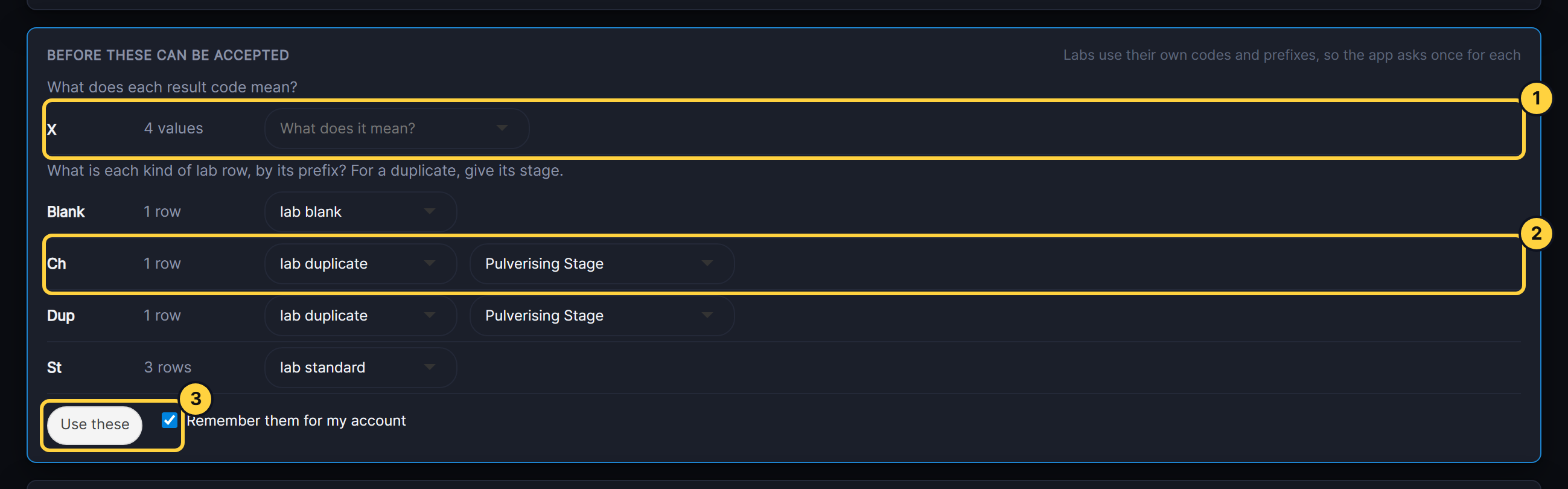
- Result code: the code as the lab wrote it, how many values carry it, and its meaning.
- Row prefix: the prefix, how many rows, its kind, and for a duplicate its stage.
- Use these: applies the answers. Remember them saves them for the laboratory.
Result
The card is gone, Batch checks shows no items to confirm, and the report’s Before this batch can be accepted section is empty.
If something goes wrong
- A code still needs a meaning. The message after Use these says how many. A row is still on What does it mean?.
- Two prefixes cannot be lab duplicates at the same stage. Change one prefix’s stage, or its kind.
- A saved answer was wrong. Change or delete it under Your set-up, Codes and prefixes. A deleted one is asked about again on the next certificate that has it.
Next steps
- Read the certificate report
- Set up codes and prefixes for each laboratory, before the next certificates arrive.