Add a client and give it its own set-up
How does a consultancy keep each client apart in QC Analytical Results? Add a client, give it projects, and it gets its own CRM library and rules.
At the end the client has its own projects, and its certificates are judged against its own CRM library and rules.
Clients are for a consultancy. A company that checks only its own certificates can leave this empty. A client’s projects use the client’s library and rules. Any rule the client does not set follows the account’s.
Before you begin
- Signed in.
Steps
- On the Lab files tab, scroll to Your set-up and select the Clients pill.
- Type the client’s name in the box and select Add the client. The table lists it with no projects.
- Select the client’s row. Its details open under the table.
- Under Its projects, choose the projects that belong to it, then select Save. A project can belong to one client.
- Select the CRM library pill. Under Library, choose the client, and add its certified values. Save CRM values to your library says how.
- Select the Rules pill. Under Rules for, choose the client, change what should differ from the account’s rules, and select Save these rules.
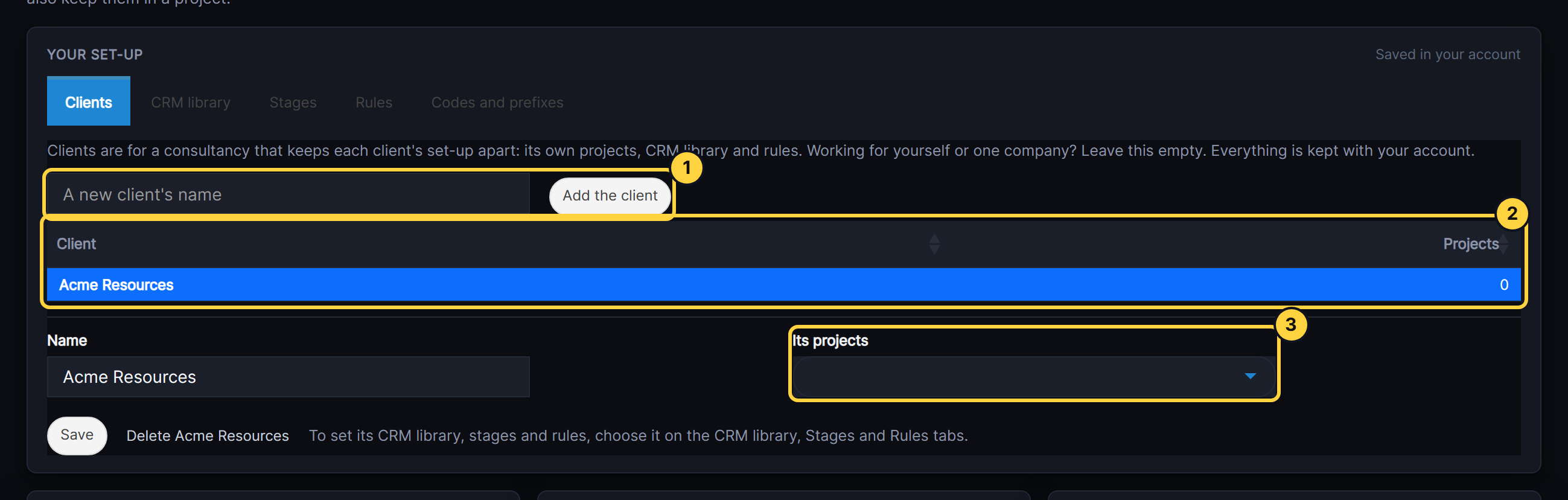
- A new client’s name and Add the client.
- Clients: one row each, with how many projects.
- Its projects: the projects that belong to the client picked.
Result
Under Keep them?, a certificate saved to one of the client’s projects is checked against the client’s library and rules.
If something goes wrong
- You already have a client called that. Names are unique in an account. Pick the existing one.
- The client cannot be deleted. It has projects. Move them to another client under Its projects, or delete them under Projects, then delete the client.
- The client’s CRM values are not used. The project is not in the client’s projects yet. Save it there and open the project again.